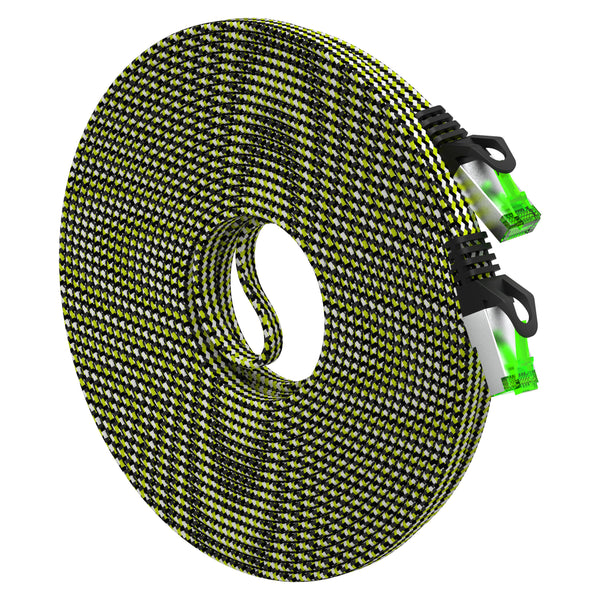
Picking Ethernet is simpler when you make three decisions in order: the data speed you need (1G, 2.5G, 5G, or 10G), the environment the cable must live in (quiet indoor room, EMI-heavy shop floor, or outdoors in sun and water), and how you’ll terminate the run (pre‑made patch vs bulk with field ends). This core guide brings those decisions together so you can match a practical cable to real‑world spaces in the United States—homes, apartments, small businesses, classrooms, AV racks, and light industrial areas—without overbuying.
As you read, you’ll see short callouts to deeper GEARit resources that answer the next level of questions. Each link is chosen to solve a specific problem: interference near LED dimmers, PoE planning for cameras and APs, 100 m distance rules, outdoor jackets, industrial noise, ruggedized connectors for gigs, and more. Use them as needed; this page stands on its own as a complete buyer’s overview.
Start With Speed: What Are You Actually Trying to Carry?
For most U.S. homes and many small offices, traffic patterns center on a few common needs: a gigabit ISP plan, multi‑gig backhauls inside the network (2.5G/5G), and sometimes a 10G workstation or NAS link. The cable category defines the highest practical data rate you can sustain over distance. If you only change one thing, pick the right category for your channel length, then layer on environment and termination decisions.
Category quick hits (and why they matter)
- Cat6: A workhorse for 1G up to a full 100 m channel (328 ft). Often supports 2.5G/5G on typical shorter runs. Can do 10G on shorter, clean channels (often around 55 m) when everything else is tidy.
- Cat6a: Built to carry 10G to the full 100 m with margin. Also adds headroom in noisy spaces and dense bundles. If you need guaranteed 10G end‑to‑end, this is the copper baseline.
- Cat8: Designed for very short, very fast copper links—roughly rack‑to‑rack distances up to ~30 m. Great for labs, benches, and patch‑heavy equipment rows, not full home runs.
If you’d like a deeper comparison of category tradeoffs, supported distances, and when to step up for multi‑gig or 10G, see Cat6 vs Cat6a vs Cat8: Pick the Right Cable for 1G, 2.5G, 5G, and 10G. That guide translates lab specs into simple, everyday choices for houses, apartments, and small businesses.
Decision matrix: choose by speed target and run length
Use this compact table to map a realistic need to a practical cable category. It assumes typical U.S. residential or light‑commercial installs with clean terminations.
| Use case | Target speed | Channel length | Recommended category | Why this fits |
|---|---|---|---|---|
| ISP to router, desk patches | 1G | Up to 100 m | Cat6 | Reliable at 1G with margin across full channel; widely available and cost‑effective. |
| Multi‑gig backhaul in home/SMB | 2.5G / 5G | Short to medium | Cat6 or Cat6a | Cat6 often works on common lengths; Cat6a for longer runs or noisier bundles. |
| Workstation ↔ NAS or core switch | 10G | Short to long | Cat6a | Delivers 10G up to the full 100 m channel and reduces retransmits. |
| Bench/rack interconnects | Up to 25G/40G copper | Short | Cat8 | Short‑reach, high‑bandwidth copper in controlled spaces. |
The 100 m Rule and How Channel Math Actually Works
Standard copper Ethernet channels top out at 100 meters (328 feet). That budget is the sum of every segment end‑to‑end: your patch from the switch or router, the in‑wall or in‑conduit run, the patch panel jump, and the device‑end patch. If you’re nearing 100 m, you can trim patch lengths, choose Cat6a for margin, or add an active hop.
For a hands‑on explanation of channel math—and what to do when you must go past 100 m—see Patch Cable Length Limits and When You Need a Booster or Longer Run Strategy. It covers mid‑span switches, PoE extenders, and fiber conversions so you don’t gamble on a marginal link.
Environment Changes Everything: Quiet Rooms, Noisy Plants, and the Great Outdoors
Once your speed target is clear, the next filter is where the cable has to live. Interference, temperature, sun, water, and physical abuse all drive construction choices: shielding, jacket material, and sometimes the connector type itself.
Shielding vs unshielded: match the cable to real EMI
In clean indoor spaces with a bit of separation from AC cords, unshielded twisted pair (UTP) is flexible and dependable for short to medium runs. Shielded constructions (FTP, S/FTP, etc.) start paying off when your path hugs power, passes behind AV stacks, or heads outside to PoE cameras. You don’t buy speed with shielding; you buy stability when noise couples into the line.
For a practical refresher—complete with scenarios, a quick‑pick summary, and installation tips to reduce interference without overspending—see Shielded vs Unshielded (S/FTP vs UTP): How to Reduce Interference at Home. It’s written for typical U.S. homes where LED drivers, dimmers, and power strips coexist with routers and consoles.
Outdoor realities: jackets, water control, and burial
Sun, water, and soil quickly expose the difference between indoor PVC and outdoor‑rated jackets. On the surface, a UV‑resistant cable can run along siding or soffits. Underground, you’ll want a direct‑burial design intended for moisture and abrasion. Where possible, conduit adds physical protection and easier replacement later.
For an end‑to‑end outdoor playbook—cable types, burial methods, moisture control, glands and enclosures—see Weather, Water, and Conduit: Best Practices for Outdoor Installs | GEARit. If you’re deciding between true direct‑burial versus UV‑resistant jackets for above‑ground routes, compare the tradeoffs in Outdoor Ethernet: Direct‑Burial vs UV‑Resistant Jackets and When to Use Each.
Industrial and high‑EMI spaces
Plant floors and shops introduce variable‑frequency drives, welders, radios, and high‑current feeders—classic EMI sources. Shield construction and proper bonding become more relevant here, and cable routing in trays with power requires extra discipline. If link stability and deterministic behavior matter near drives, step up your cable construction and termination plan.
For a quick, scenario‑driven primer that translates shielding types, jackets, and grounding into confident picks, read Industrial Ethernet Quick Start: Picking Cable for Noisy Environments.
Decision Matrix: Pick by Environment and Handling Needs
Use the matrix below to match construction to the place the cable has to live. In each case, assume you’ve already chosen a category (Cat6, Cat6a, or Cat8) that meets your speed and length goals.
| Environment | Recommended construction | Why it fits | Tradeoffs | Notes |
|---|---|---|---|---|
| Quiet indoor room | UTP patch (Cat6) | Flexible, cost‑effective, easy to reroute. | Less immunity to nearby noise sources. | Keep sensible spacing from AC cords and power strips. |
| Dense AV rack / near power | Shielded patch or shielded run | Improves stability near PSUs, dimmers, and amplifiers. | Requires correct shield termination; stiffer handling. | Follow manufacturer guidance for grounding and connectors. |
| Outdoor, above‑ground | UV‑resistant jacket (shielded if near power) | Handles sun, temperature, and light abrasion. | Protect connectors from water; plan drip loops. | Conduit helps with service loops and future swaps. |
| Outdoor, underground | Direct‑burial LLDPE/HDPE (often shielded) | Resists moisture and soil contact; robust jacket. | Thicker cable; plan bends and entry seals carefully. | Conduit optional but recommended in rocky or high‑traffic soil. |
| Industrial/high‑EMI | Shielded construction matched to noise level | Reduces CRC errors, retries, and link flaps. | More careful termination and bonding. | Route away from VFDs and high‑current trays when possible. |
Termination: Pre‑Made Patch vs Bulk Cable
Pre‑made patch cords get you online fast, reduce field‑termination errors, and are easy to swap. Bulk cable with keystones and a patch panel looks clean at the wall and scales well when you’re pulling many fixed drops. Stranded conductors are common in flexible patch cords; solid conductors dominate longer in‑wall runs. Both can produce excellent channels when installed correctly.
For a balanced decision table, an honest tool list, and a simple worksheet to budget materials and time, see Bulk Cable vs Pre‑Made Patch: Termination Tools and Cost Worksheet. It helps you decide when pre‑terminated saves the day and when bulk is cleaner.
Termination decision matrix
This quick matrix summarizes when each approach tends to win for homes and small businesses.
| Scenario | Pre‑made patch | Bulk + keystones/panel | Why |
|---|---|---|---|
| Single desk or console move | Strong fit | Overkill | Speed and flexibility matter more than wall plates. |
| Four rooms, new drywall | Okay | Strong fit | Bulk makes clean outlets and centralized patching. |
| Outdoor garage/AP camera run | Good with outdoor‑rated pre‑terminated | Good | Choose jacket for environment; plan seals regardless. |
| Temporary lab bench/rack | Excellent | Unnecessary | Frequent changes favor pre‑made and color coding. |
Power over Ethernet (PoE): Gauge, Heat, and Distance
PoE concentrates more design decisions into the same copper: conductor size (AWG), channel length, bundling/heat, and device power class. Many cameras and APs are fine on 24 AWG copper for full 100 m channels at 802.3af power levels when terminations are clean. As you move to higher draw (802.3at and beyond), thicker 23 AWG copper, shorter channels, or Cat6a construction adds margin.
If you’re mapping cameras and APs around a property, the planning details—channel budgeting, gauge choices, and practical patch strategies—are all laid out in PoE and PoE+: Cable Gauge and Distance Planning for Cameras and APs. It focuses on 802.3af/at installs for U.S. homes, small businesses, and light commercial sites.
Simple PoE planning table
These conservative guidelines help you pick a starting point; your exact distances will depend on total channel length and terminations.
| PoE level | Typical device | Conductor guidance | Channel guidance | Notes |
|---|---|---|---|---|
| 802.3af (PoE) | Basic IP cam, compact AP | 24 AWG copper Cat6 ok | Up to 100 m when clean | Short patches preserve budget and margin. |
| 802.3at (PoE+) | PTZ cam, Wi‑Fi 6/6E AP | Prefer 23 AWG copper | Shorten runs if using 24 AWG | Bundled cables warm up; plan for heat. |
Flat vs Round, Low‑Profile Routing, and Bend Radius
Flat patch cords can disappear under rugs, along baseboards, and across thresholds where a round cable creates a visible bump. The tradeoff is mechanical: round cables better preserve pair geometry, support thicker jackets and shields, and generally handle PoE current and frequent re‑patching with more margin. If you need a clean look across a doorway or rental‑friendly routing along trim, a short flat lead paired with a round backbone is a common compromise.
For bend‑radius tips, under‑carpet routes, and a simple decision table that explains when each shape excels, check Flat vs Round Ethernet: Bend Radius, Under‑Carpet Runs, and Trade‑offs.
Example low‑profile choices
- Short, tidy patch at a desk or console where clearance matters: a compact flat lead can minimize snags and visual clutter. A braided flat option like a 25‑foot size keeps the run discreet; a practical example is a flat, braided Cat7 patch for low‑profile routing. Choose short lengths for best results.
- Longer backbone to an AP or camera: favor a round, outdoor‑rated jacket with adequate gauge and, where appropriate, shielding for PoE stability (more below in Outdoor sections).
Outdoor Planning: Above‑Ground vs Direct‑Burial
Before you dig or strap a cable to a fence, decide whether the route must live underground or in sun and air. Above ground, UV‑resistant jackets are built to handle sunlight and temperature swings. Underground, direct‑burial jackets tolerate constant soil contact and incidental water.
The practical differences—jacket chemistry, water pathways, abrasion resistance—are unpacked in Outdoor Ethernet: Direct‑Burial vs UV‑Resistant Jackets and When to Use Each. And when you’re ready for burial depths, sealing, drip loops, and conduit sweep choices, see Weather, Water, and Conduit: Best Practices for Outdoor Installs | GEARit.
Product‑fit examples (outdoor)
- For a long outdoor run to a shed, AP, or camera where burial or constant exposure is likely, a purpose‑built 23 AWG, shielded, direct‑burial Cat6 helps with PoE margin and durability. A representative option is Cat6 Outdoor Cable, waterproof direct‑burial, 23 AWG. It’s a good fit when you need a rugged jacket and foil shielding for electrically busy yards or shared conduits.
- For short, exposed outdoor jumps—soffits, posts, pole‑mounted devices—a weather‑resistant, shielded patch can handle UV and incidental rain while keeping termination consistent. See a shielded outdoor Ethernet patch with S/FTP construction as an example for short exterior spans.
Specialty Scenarios: Pro Audio, Gaming, and Industrial
Live sound and AV: ruggedized RJ45 when mechanical security matters
Standard snagless RJ45 cords are reliable for fixed gear and short patches, especially when you want fast changes and easy unlatches. On mobile rigs, festival stages, and touring racks where vibration, foot traffic, and repeated load‑ins abuse connectors, locking shells that mate with panel‑mount jacks protect the RJ45 and prevent accidental disconnects.
For a plain‑English breakdown of what “EtherCON‑style” ruggedized RJ45 really means—and when it’s worth the cost for Dante/AVB audio or Art‑Net/sACN lighting—see EtherCON and Pro Audio Networking: When Ruggedized RJ45 Makes Sense. You’ll also find guidance on when a standard snagless Cat6 patch is the smarter choice.
Gaming over Ethernet: low latency without overspending
Wired links beat Wi‑Fi for consistent latency and fewer spikes. Most PC and console gamers on 300 Mbps to 1 Gbps ISP plans do well with a quality Cat6 patch for short desk runs. You’ll see the most benefit from clean channel routing, reasonable cable lengths, and sensible router/QoS settings, not from flashy labels.
If you’re deciding when to step up categories, whether shielding helps in your room, or how to keep the total channel under 100 m for console placements around the house, read Gaming Over Ethernet: Low‑Latency Setup Without Overbuying. It focuses on practical gains and leaves hype at the door.
Industrial quick start: deterministic behavior in noisy bays
Near VFDs, welders, and large motors, EMI can surface as intermittent link flaps, CRC errors, and speed “downshifts.” Shielding type and how you terminate it matter, as does route planning away from power feeders. If your PLCs, HMIs, and vision systems need stable links, build in noise margin up front.
Use Industrial Ethernet Quick Start: Picking Cable for Noisy Environments to translate noise sources, coupling paths, and shield constructions into concrete cable picks and layout tips.
Reliability Basics: Handling, Bend Radius, and Patch Choices
Ethernet is forgiving, but not limitless. Don’t crush cables under furniture feet, over‑tighten zip ties, or force sharp 90‑degree bends. Maintain gentle curves (think: the diameter of a small soda can for tight spots), leave strain relief at connectors, and avoid tight bundles that trap heat—especially on PoE.
Short, flexible patches protect jacks and make device moves easier. If you’re populating a classroom, office, or lab bench with frequent re‑patching, snagless boots and color coding save time. For legacy gear or budget 1G segments, a basic example is a stranded Cat5e snagless patch for everyday 1G device leads. For higher‑speed backbones, pair short, flexible patches with a category‑appropriate in‑wall or outdoor run.
Troubleshooting Comes Last—but Saves Projects
Even with careful planning, reality throws curves: a marginal plug, a crushed section behind a cabinet, or a camera that reboots only under PoE load. A simple A/B swap with a known‑good patch often narrows the problem to the cable or the device in seconds. If you need a structured workflow that starts with symptoms and moves through quick tests, bookmark Troubleshooting Guide: Common Ethernet Failures and How to Test. It covers visual checks, tester basics, and when to repair or replace.
Putting It Together: Three Real‑World Scenarios
1) House to detached garage: Wi‑Fi AP, one camera, 1G ISP
Goal: Stable gigabit link to the garage with PoE for an AP and a single camera. Future‑proofing is modest; reliability matters more than squeezing every last Mbps.
- Category: Cat6 is sufficient for 1G and common 2.5G upgrades on realistic lengths. If you anticipate 10G between house and garage later, plan conduit or consider Cat6a now.
- Environment: Outdoors with underground segment—choose a direct‑burial jacket designed for moisture and abrasion. A shield improves stability if the path shares space with power or yard lighting.
- Termination: Pre‑terminated outdoor leads save time and reduce field‑crimp errors. A practical fit is a shielded, 23 AWG direct‑burial Cat6 outdoor cable. Seal wall penetrations, create drip loops, and protect device ends in weather‑rated boxes.
- PoE planning: 802.3af/at devices should be fine at full channel lengths with 23 AWG copper. For a crisp plan—including patch budgeting—refer to PoE and PoE+: Cable Gauge and Distance Planning for Cameras and APs.
- Install help: For burial depth, conduit choices, and moisture control, use Weather, Water, and Conduit: Best Practices for Outdoor Installs | GEARit.
2) Apartment gaming setup: tidy runs, no drilling, low latency
Goal: Keep latency consistent for console and PC gaming while maintaining a clean look in a rental.
- Category: Cat6 covers 1G comfortably. For routers/NICs that support 2.5G on short channels, Cat6 remains fine.
- Environment: Indoor with furniture and door thresholds; a short, flat patch minimizes bumps and snags along baseboards or under rugs.
- Termination: Pre‑made patches for quick moves. Use a low‑profile patch near the console/desk—an example is a 25‑foot flat braided cable for under‑carpet or trim routing—and keep the rest of the channel short and round where possible.
- Why flat here? It reduces visual clutter and trip hazards for short segments. For longer spines or PoE loads, round construction is the safer default. See Flat vs Round Ethernet: Bend Radius, Under‑Carpet Runs, and Trade‑offs.
- Latency tips: The link’s stability and your traffic shaping matter more than extreme specs. For targeted gaming advice, see Gaming Over Ethernet: Low‑Latency Setup Without Overbuying.
3) Small church or venue: Dante/AVB audio, mixed fixed and mobile gear
Goal: Reliable audio over Ethernet between stage boxes, FOH, and a backstage rack, with both fixed runs and frequent weekly setup changes.
- Category: Cat6 is a dependable base for gigabit audio networks, with Cat6a where 10G backbones or longer shared trays suggest more margin.
- Environment: Mixed: some runs in conduit or trays; frequent mobile patches around risers and racks with foot traffic and vibration.
- Termination: Use standard snagless Cat6 for fixed gear and short protected jumps. Where vibration and accidental unlatching are real risks, consider ruggedized, locking RJ45 shells that mate to panel mounts.
- Why ruggedized here? A connector pop mid‑service is catastrophic. Shells protect the plastic latch and add strain relief. Learn when they’re worth it (and when they’re not) in EtherCON and Pro Audio Networking: When Ruggedized RJ45 Makes Sense.
- Troubleshooting: Keep a spare known‑good patch in the rack and a tester handy. Build a quick fault‑isolation habit with Troubleshooting Guide: Common Ethernet Failures and How to Test.
Common Pitfalls and How to Avoid Them
- Buying “shielded for speed.” Shielding increases noise immunity, not data rate. Pick category for speed, then add shielding only where EMI or outdoor runs justify it. For a nuanced home view, read Shielded vs Unshielded (S/FTP vs UTP): How to Reduce Interference at Home.
- Overlooking patch cords in the 100 m budget. Short jumpers count toward the same 100 m channel. If you’re pushing distance, plan your patches first and keep them short. See Patch Cable Length Limits and When You Need a Booster or Longer Run Strategy.
- Mismatched outdoor jackets. Using indoor PVC outside shortens life. Choose UV‑resistant for sun‑exposed surfaces and direct‑burial for underground. The differences are spelled out in Outdoor Ethernet: Direct‑Burial vs UV‑Resistant Jackets and When to Use Each.
- Ignoring PoE current and heat. Higher draw devices on long, bundled runs can drop voltage and trap heat. Plan gauge and distances with PoE and PoE+: Cable Gauge and Distance Planning for Cameras and APs.
- Forcing flat cable to do everything. Flat shines in short, low‑profile routes. For longer or PoE‑heavy paths, round construction is the safer baseline. See Flat vs Round Ethernet: Bend Radius, Under‑Carpet Runs, and Trade‑offs.
- Racking up avoidable retries. In noisy trays or near power, unshielded runs can work—until the lighting dimmer sweeps or the welder starts. If stability matters, borrow strategies from Industrial Ethernet Quick Start: Picking Cable for Noisy Environments.
Quick Picks by Situation
Use these condensed recommendations as a reality check before purchasing. Each pick assumes you’ve set a speed goal and know your rough distances.
- Short indoor device patch (PC/console/TV) with 1G–2.5G: Cat6 UTP patch. If clearance is tight across baseboard or under a rug, a short flat patch like a flat, braided Cat7 patch can be appropriate.
- 10G to a study or office across a floor: Cat6a channel end‑to‑end; keep patches short and choose shielded segments if the path shares space with power or dense AV gear. Compare category tradeoffs in Cat6 vs Cat6a vs Cat8.
- Outdoor AP or camera on a soffit/post: Above ground with sun exposure, consider UV‑resistant, shielded patching sized just long enough to reach the device. A representative short, weather‑resistant option is a shielded outdoor Ethernet patch.
- Garage or outbuilding underground link with PoE: A direct‑burial, 23 AWG shielded Cat6 such as a waterproof, UV‑resistant direct‑burial cable paired with weather‑protected device ends.
- Everyday budget 1G device leads in a lab/classroom: Stranded, snagless cords that move well. One example is a Cat5e snagless patch for short, flexible connections. When multi‑gig support is desired, step up the category accordingly.
Planning Checklist: From Paper to Patch Panel
- Define your speed target per segment. 1G for ISP/device edges? 2.5G/5G for in‑home backhauls? 10G between workstation and NAS?
- Sketch channel lengths. Include both ends’ patch cords. If you’re near 100 m, shorten patches, step up to Cat6a, or plan an active hop. See Patch Cable Length Limits.
- Map environments for each path. Indoor quiet, indoor EMI‑prone, outdoor above ground, underground, or industrial. Choose shielding and jackets accordingly using Shielded vs Unshielded and Outdoor Ethernet Jackets.
- Identify PoE devices and power classes. Pick conductor sizes and channel lengths that preserve voltage margin. Consult PoE and PoE+ Planning.
- Choose termination per drop. Pre‑made for speed and flexibility; bulk + keystones for many fixed drops. Use the worksheet in Bulk vs Pre‑Made.
- Plan outdoor details. Decide on direct‑burial vs UV‑resistant, conduit paths, sealing, and drainage. See Outdoor Best Practices.
- Document label scheme and color coding. Save time during moves and troubleshooting.
- Keep a known‑good patch and a basic tester in your kit. When something misbehaves, follow the workflow in Troubleshooting Guide.
Key Takeaways
- Pick category for speed first (Cat6 for 1G and often 2.5G/5G on typical lengths; Cat6a for guaranteed 10G up to 100 m; Cat8 for very short, very fast copper). Details: Cat6 vs Cat6a vs Cat8.
- Respect the 100 m budget and remember that patch cords count. If you must go farther, add an active hop or change media. Details: Length Limits & Strategies.
- Match construction to environment: unshielded for clean indoor paths; shielded where EMI or outdoor exposure justifies it. Details: Shielded vs Unshielded, Outdoor Jackets.
- Size PoE with conductor gauge and length in mind, especially for higher‑draw devices and bundles. Details: PoE Planning.
- Use flat only where its low profile matters; choose round for longer, PoE‑heavier, or rough‑handling paths. Details: Flat vs Round.
- Consider ruggedized or industrial approaches when failure is public or costly—stages, shop floors, and high‑EMI bays warrant extra margin. Details: EtherCON in Pro Audio, Industrial Quick Start.
Frequently Asked Questions
Do I need shielded cable for 10G?
No—10G over copper is a category question, not a shielding question. Cat6a is the standard choice for 10G up to a full 100 m channel. You add shielding when your path lives near EMI (dimmers, PSUs, motors) or outdoors, not to increase speed. For practical scenarios and install tips, see Shielded vs Unshielded.
How far can I run Ethernet without a booster?
The copper channel budget is 100 meters (328 feet), including all patch cords and the in‑wall run. If you must exceed that, you can add an intermediate switch, use a PoE extender for cameras, or convert to fiber for long hops. For a step‑by‑step distance plan, read Patch Cable Length Limits and When You Need a Booster or Longer Run Strategy.
What cable should I buy for outdoor security cameras?
First, decide on the route. For underground paths or constantly wet areas, pick a direct‑burial, outdoor‑rated cable with a rugged jacket and, often, shielding. For soffits and fence lines with sun exposure, a UV‑resistant cable can be sufficient if you protect connectors from water. For moisture control, drip loops, and conduit choices, consult Outdoor Best Practices and compare jackets in Outdoor Ethernet Jackets. For PoE distance and gauge choices, use PoE and PoE+.
Is flat Ethernet okay under a rug or across a doorway?
Yes—for short, low‑profile routes where clearance matters, a flat patch is handy. Keep the length modest and avoid PoE‑heavy loads if you can; use round cable for longer backbones, higher current, or frequent re‑patching. For bend‑radius rules, pros/cons, and a decision table, see Flat vs Round Ethernet.
Should I pull bulk cable or use pre‑made cords?
Use pre‑made when speed, flexibility, and frequent changes matter—desks, consoles, lab benches, classrooms. Pull bulk with keystones and a patch panel when you’re wiring several fixed drops or want clean wall plates and a centralized rack. For a side‑by‑side decision table and a fill‑in budgeting worksheet, go to Bulk Cable vs Pre‑Made Patch.
Where to Go Next
If you know your required speed and have a rough channel length, pick the category using Cat6 vs Cat6a vs Cat8, then refine by environment using Shielded vs Unshielded and outdoor guides. If PoE is involved, plan gauge and distances with PoE and PoE+. Keep the 100 m channel in view with Length Limits, and lean on Troubleshooting whenever a link misbehaves.