

Reliable PoE starts with the right conductors and a realistic distance plan. This guide focuses on typical U.S. homes, small businesses, and light commercial installs, showing how to choose gauge and manage the 100 m channel budget for 802.3af (PoE) and 802.3at (PoE+). Where it helps, you'll find links to related how‑to articles for deeper context.
Quick planning cheat sheet
- 100 m channel rule: Keep the entire permanent link plus both patch cords at or under 100 meters (328 feet). Shorter runs add PoE headroom and help with multi‑gig backhauls.
- PoE (802.3af, up to ~12.95 W at device): 24AWG pure‑copper Cat6 typically reaches the full 100 m with clean terminations and short patches. If you’re mapping multi‑gig uplinks, skim Cat6 vs Cat6a vs Cat8: Pick the Right Cable for 1G, 2.5G, 5G, and 10G.
- PoE+ (802.3at, up to ~25.5 W at device): Favor 23AWG pure copper for long channels, warm spaces, or bundles. With 24AWG copper, keep runs in the ~70–80 m range to curb voltage drop and thermal rise.
- Patch cords count: Use short, flexible stranded jumpers to protect jacks and preserve the channel budget. For a durable rack lead, consider a Cat6 pure‑copper patch in black. For tight device ends, a soft‑tab design reduces snagging, such as a premium flexible soft‑tab Cat6 patch.
- Plan patches first: Subtract rack‑end and device‑end jumpers from 100 m before you cut the horizontal run. If your jumpers must be long, see Patch Cable Length Limits and When You Need a Booster or Longer Run Strategy.
How gauge and conductor construction affect PoE
Lower AWG numbers mean thicker copper and lower resistance—exactly what PoE likes. Construction details matter just as much as gauge:
- Pure copper (bare copper): Predictable resistance and better thermal behavior. This is the safe pick for higher‑power PoE+ and long channels.
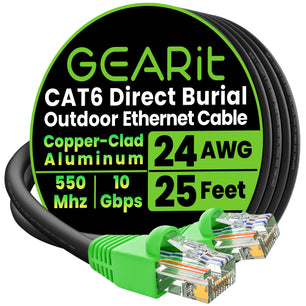
- CCA (copper‑clad aluminum): Higher resistance than pure copper. It can work on short, light‑load links, but for PoE+ headroom, choose pure copper.
- Solid vs stranded: Solid conductors are typical for in‑wall runs; stranded excels for short, flexible patching at the switch and device ends.
If you’re mapping today’s speed and tomorrow’s, compare categories in Cat6 vs Cat6a vs Cat8.
Gauge, power class, and distance: a practical decision matrix
Use this compact table to pick a conservative starting point. Assumes quality ends, ambient temperatures within spec, and short stranded patches.
| Scenario | Device power class | Recommended conductor | Practical channel length | Why this choice |
|---|---|---|---|---|
| Indoor fixed camera | PoE 802.3af (≤13 W) | 24AWG pure‑copper Cat6 (solid horizontal) | Up to 100 m | Lower current makes full‑length channels realistic with clean terminations. |
| Wi‑Fi 6/6E access point | PoE+ 802.3at (~16–22 W typical) | 23AWG pure‑copper Cat6/6a | ~70–100 m | Thicker copper lowers voltage drop and helps in warm ceilings or small bundles. |
| Outdoor fixed camera | PoE 802.3af (≤13 W) | Weather‑rated Cat6; prefer pure copper for longer runs | Up to 100 m (pure copper) | Modest current; jacket and moisture protection drive reliability. |
| Outdoor PTZ or multi‑radio AP | PoE+ 802.3at (20–25.5 W) | 23AWG pure‑copper outdoor Cat6/6a | ~70–90 m | Higher current favors thicker copper and meticulous terminations. |
Step‑by‑step distance planning
- Confirm device draw: Check the spec sheet for PoE class or max watts. Note peak events like PTZ start‑up, IR LEDs, or dual‑band radios at full transmit.
- Select conductor and category: Choose 23AWG pure copper when the link approaches 100 m or load is higher; 24AWG copper works well for most PoE and mid‑length PoE+ runs. For roadmap planning, see Cat6 vs Cat6a vs Cat8.
- Budget the channel: Subtract patch lengths from 100 m. If you must use longer jumpers, review mitigation ideas in Patch Cable Length Limits and When You Need a Booster or Longer Run Strategy.
- Mind workmanship: Maintain pair twist to the contact, respect bend radius, and avoid tight staples. These small habits add real PoE headroom.
- Verify under load: After install, confirm link speed and PoE class negotiation at the device end. If the device browns out, shorten a patch or step up conductor gauge.
Patch cords that make installs easier
Most issues happen at the ends. Stranded jumpers protect jacks, route easily, and keep channels within spec. For tidy racks, color‑code uplinks with compact lengths such as a Cat6 pure‑copper patch in yellow or a Cat6 pure‑copper patch in white. At cramped device ends, a soft boot helps avoid broken tabs; consider a premium flexible soft‑tab Cat6 patch in black or an easy‑to‑spot service‑loop color like soft‑tab Cat6 patch in orange.
If you’re deciding between field termination and pre‑made leads, weigh time, tools, and rework risk in Bulk Cable vs Pre‑Made Patch: Termination Tools and Cost Worksheet.
Shielded or unshielded for PoE cameras and APs?
Power delivery works with both UTP and shielded designs. Choose based on interference risk, not PoE level alone. In most U.S. homes and small offices, UTP Cat6 is simpler and plenty reliable. Near HVAC motors, welders, long parallel runs with mains, or dense trays, shielded cable can preserve higher data rates. For home environments, see Shielded vs Unshielded (S/FTP vs UTP): How to Reduce Interference at Home; for shops and factories, review Industrial Ethernet Quick Start: Picking Cable for Noisy Environments.
Bundle heat, ceilings, and why Cat6a can help
Tighter bundles and warm plenum or attic spaces raise conductor temperature and resistance. If you must bundle several PoE+ runs, leave air space, route away from hot spots, and consider Cat6a for extra crosstalk and thermal margin. If you’re curious about bend‑radius trade‑offs in tight pathways, see Flat vs Round Ethernet: Bend Radius, Under‑Carpet Runs, and Trade‑offs.
Outdoor runs: jackets, burial, and distance trade‑offs
For U.S. exterior routes, use UV‑resistant jackets and protect terminations from moisture. Building‑to‑building links benefit from direct‑burial‑rated cable or conduit with drainage and pull strings. For jacket choices and construction tips, start with Outdoor Ethernet: Direct‑Burial vs UV‑Resistant Jackets and When to Use Each and detailed job‑site practices in Weather, Water, and Conduit: Best Practices for Outdoor Installs | GEARit.
Choosing cable category for today and tomorrow
PoE doesn’t dictate category; your data rate and interference environment do. Cat6 is a practical choice for 1G and many 2.5G backhauls; Cat6a buys crosstalk headroom and smoother 10G over distance. If you’re balancing time vs tools, compare approaches in Bulk Cable vs Pre‑Made Patch.
Troubleshooting: confirm power and link before you climb the ladder
- Start with continuity and wiremap: Fix physical‑layer issues before blaming the cable category.
- Measure PoE under load: An inline tester that shows voltage, class, and watts at the far end quickly validates power delivery.
- Isolate patches: Swap device‑end and switch‑end jumpers; many “bad cables” are actually tired or too‑long patches. For a structured workflow, see Troubleshooting Guide: Common Ethernet Failures and How to Test.
Example build lists
- Indoor AP on PoE+ (~20 W), ~65 ft total: Use a solid in‑wall Cat6 horizontal run and keep jumpers short. At the AP, a soft‑tab jumper eases service in tight spaces—try a premium flexible soft‑tab Cat6 patch in white.
- Detached‑garage camera on PoE (~8–10 W), ~120 ft building‑to‑building: Choose a weather‑appropriate path (direct burial or conduit) and keep indoor patches minimal. Color‑code the NVR side with a Cat6 pure‑copper patch in orange for fast ID.
- Crowded ceiling tile or tight mount: Use a short, flexible soft‑tab jumper to reduce bend stress and snag risk; for easy visual tracing, pick a soft‑tab Cat6 patch in purple.
Frequently Asked Questions
Can I run PoE or PoE+ the full 100 meters?
Often yes for PoE (802.3af) on 24AWG pure‑copper Cat6 with short patches and clean terminations. For PoE+ (802.3at), use 23AWG pure copper for long channels—or keep 24AWG runs shorter (~70–80 m) to preserve voltage at the device.
Is CCA cable okay for PoE cameras?
It can work for light loads and short distances, but higher resistance shrinks power margin. For PoE+ or near‑limit runs, choose pure‑copper conductors.
Do I need shielded cable for outdoor cameras?
Not by default. Choose shielding when runs parallel high‑voltage wiring, pass near motors, or share dense trays. Otherwise, UTP is simpler to route and terminate. For more context, see Shielded vs Unshielded.
What if my PoE device reboots randomly?
Suspect low voltage at the device under load. Shorten a patch, step up conductor gauge, verify the PSE’s watt budget, and follow the checks in Troubleshooting Guide: Common Ethernet Failures and How to Test.
Next steps
If you want extra headroom for future APs and cameras, review category trade‑offs in Cat6 vs Cat6a vs Cat8. Planning a long channel with unusual patch needs? Start with Patch Cable Length Limits. For outdoor routes, confirm jacket and pathway choices in Outdoor Ethernet and Weather, Water, and Conduit: Best Practices for Outdoor Installs | GEARit.


